
Limited-time Udemy offer
$9.99
Leadership For Project Managers Leading People And Projects
Unlimited redemptions
Available until September 18, 2026 5:09 PM PDT
66D6FD5906E09C4284FE
A project team sits down to build their Work Breakdown Structure. The PM opens a spreadsheet, writes the project name at the top, and starts listing what the team needs to do. "Draft requirements document." "Schedule vendor calls." "Configure the test environment." "Review contracts." The list grows. By the end of the session, it is three pages long, and the team lead says it looks comprehensive. No one notices that every entry is a verb. No one notices that what they built is a task list organized by person, not a scope map organized by deliverable. Six weeks later, when the schedule is overrunning and cost is up, the investigation finds three significant outputs that were never assigned, never estimated, and never tracked, because they were never in the structure at all. This is the most common WBS mistake, and it is almost invisible until the damage is done.
A Work Breakdown Structure is a hierarchical decomposition of the total project scope into progressively smaller components, down to the level where each component can be assigned, estimated, and tracked. Think of it as a tree. The trunk is the project itself. The major branches are the large areas of deliverable work. Those branches divide into smaller ones. The leaves at the ends, the smallest components the structure tracks, are called work packages. Every element in the tree represents something that will be delivered or produced, not something that will be done. The WBS is organized by output, not by activity.
That distinction, output versus activity, is not a technicality. It is the structural principle that determines whether a WBS is useful or misleading. A structure built from deliverables maps directly to the scope statement: you can verify that every item the scope statement promises appears somewhere in the tree. A structure built from tasks gives you a partial picture of one team's current thinking about how they might approach the work. The first can be audited for completeness. The second cannot.
The clearest test for any WBS entry is the part-of-speech test: is this a noun or a verb? "Database schema" is a noun and a deliverable. "Configure the database" is a verb and an activity. "User training program" is a deliverable. "Train the users" is a task. Deliverables can be completed and handed over. They exist after the project is done and can be pointed to as evidence of what was built. Activities are the work performed to produce deliverables. Both matter to the project. They belong in different planning artifacts. The WBS holds deliverables. The schedule, built later from the WBS, is where activities appear.
When entries like "coordinate vendor calls" or "run status meetings" appear in a WBS, it is a signal that the structure has slipped from scope decomposition into process documentation. Those activities are real. They will happen. But they are not deliverables, and they should not occupy a slot in the scope structure alongside the outputs the project is contracted or chartered to produce. A WBS with activities mixed into it cannot reliably satisfy the 100% rule, cannot be used to verify scope coverage, and cannot serve as the stable foundation the schedule and cost model need to stand on.
One of the most reliable questions in a WBS development session is "how far do we break this down?" The answer is practical, not theoretical: decompose until the result is assignable to a specific person or team, estimable with reasonable confidence, and trackable for progress. If a work package still feels vague enough that two different people would estimate it quite differently, or if no clear owner comes to mind, break it further. If decomposing further would produce entries so granular they add no useful information (for instance, "draft paragraph four of the introduction" or "attach signature block to the contract template"), stop. The right depth is the depth that gives the project team useful visibility, not the maximum possible subdivision of work.
In practice, most projects reach useful depth somewhere between three and five levels. Complex technical projects, large construction programs, and government contracts sometimes go deeper. Small projects with experienced teams may need only two or three levels to achieve full coverage. The depth test is always the same: can the team assign this, estimate this, and track this? If yes, stop. If no, go one level deeper and test again.
The most important rule for a WBS is the 100% rule: the structure must capture 100 percent of the project scope, nothing more and nothing less. Every deliverable in the scope statement must appear somewhere in the WBS. Every element in the WBS must trace back to something in the scope statement. Neither list contains things the other does not. The two documents are different representations of the same agreed scope.
The practical consequence of failing this rule is significant. A deliverable not in the WBS does not exist as far as the project plan is concerned. No one will be assigned to produce it. No estimate will cover the effort. No schedule slot will contain it. When it surfaces during execution or at delivery (and it will surface), the team must produce it outside the plan, at full cost and full urgency, with none of the preparation that the planning process would have provided. Missing work packages are not discovered until they are already overdue. The 100% rule is the check that prevents this. Running it explicitly, by cross-referencing the scope statement against the WBS after the first draft is built, is the difference between a WBS that holds and one that has gaps the team will find at the worst possible moment.
The work package is the lowest level of the WBS, the leaf on the tree. It is also the point where the hierarchical scope structure connects to every other planning artifact. Time estimates are assigned at the work package level. Cost estimates attach here. Resource assignments and accountability attach here. The work package has an identifier, a code like 1.2.3, that the schedule, the cost model, and the risk register all reference. The WBS is not just a scope map. It is the structural framework the entire plan is organized around, and the work package is the unit that makes that organization possible.
This is why the WBS step cannot be skipped or compressed. A schedule that is not grounded in WBS work packages has nothing solid to organize itself against. A cost model that does not trace to work packages cannot be validated against scope. Assignments made without a clear WBS create ambiguity about ownership that shows up in execution as dropped handoffs, duplicated effort, and deliverables nobody thought was their responsibility. Getting the WBS right before building the schedule is not procedural discipline for its own sake. It is what makes the schedule, the budget, and the accountability structure all point at the same thing.
A WBS built by the project manager alone has predictable gaps: it is complete in the areas the PM knows well and thin in every area that requires technical or operational knowledge the PM does not carry. Subject matter experts know what their areas actually produce. The database architect knows what a completed database layer involves. The integration lead knows what each connection point between systems requires. The documentation lead knows that a training package involves more than a slide deck. The PM holds the structure and enforces the rules. The SMEs supply the content.
Involving the team in WBS development also creates something harder to measure but equally important: ownership. A team member who helped decompose their own area of work understands why each work package is there, what it involves, and what it connects to. They will estimate it more honestly and track it more faithfully than someone who received a label from the PM and was told to proceed. The WBS development session is not a status meeting or a briefing. It is a working session where the people who will do the work build the structure that will organize it. The quality of that session is reflected in the quality of everything that comes after.
The content of a WBS is fixed: a hierarchical decomposition of scope down to assignable, estimable work packages. The format is a choice, and three formats cover most situations.
The tree diagram arranges work packages in a branching graphic, with the project at the top and levels descending visually. Boxes are connected by lines. Each level of the hierarchy is visible at a glance, and the parent-child relationships are immediately apparent. Tree format works well for stakeholder presentations, initial scope reviews, and any situation where a broad audience needs to grasp the full scope structure quickly. Its practical constraint is scale: a large project produces a tree too wide to read on a single page or screen, and navigating a multi-page tree is unwieldy in working sessions.
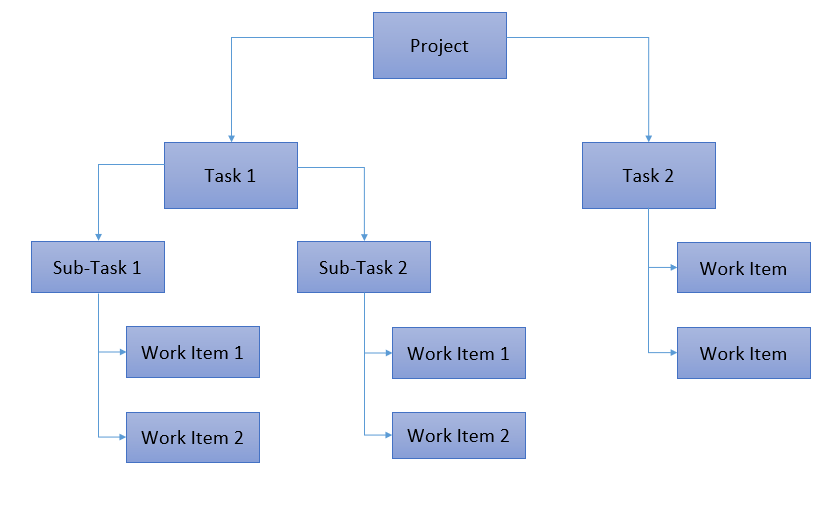
The tabular or outline format represents the same hierarchy using indentation, like a document outline. The project sits at the top, major deliverable areas sit one level below it, and work packages appear at the deepest indentation. In more complex projects, intermediate sub-deliverables may sit between the major areas and the work packages, adding additional levels as needed. This format scales to any project size, integrates naturally with project management tools, and is easy to read and update in working sessions. It does not look as visually striking as a tree, but it handles complexity that would overwhelm a tree diagram. The following example shows a sample WBS section in tabular form.
| WBS Code | Deliverable | Level |
|---|---|---|
| 1.0 | Client Portal Project | Project |
| 1.1 | User Interface | Major Deliverable |
| 1.1.1 | Login and Authentication Module | Work Package |
| 1.1.2 | Dashboard and Reporting Views | Work Package |
| 1.1.3 | Client Profile Management Screen | Work Package |
| 1.2 | Backend System | Major Deliverable |
| 1.2.1 | Database Schema and Data Migration | Work Package |
| 1.2.2 | API Layer and Integration Points | Work Package |
| 1.3 | Documentation and Training | Major Deliverable |
| 1.3.1 | User Guide | Work Package |
| 1.3.2 | Administrator Training Session | Work Package |
Scheduling software adds a third format: the WBS is built directly in the project management tool as an outline, and work packages appear in the schedule as the reference points from which activities and tasks are planned. The advantage is connection: the scope structure and the schedule become the same artifact. Changing the scope in the outline propagates into the schedule, and adding a new task to the schedule is simultaneously an update to the WBS. On projects where the scope is expected to evolve, or where the PM needs the schedule and WBS in constant alignment, building both together in a tool from the start saves significant reconciliation effort later.
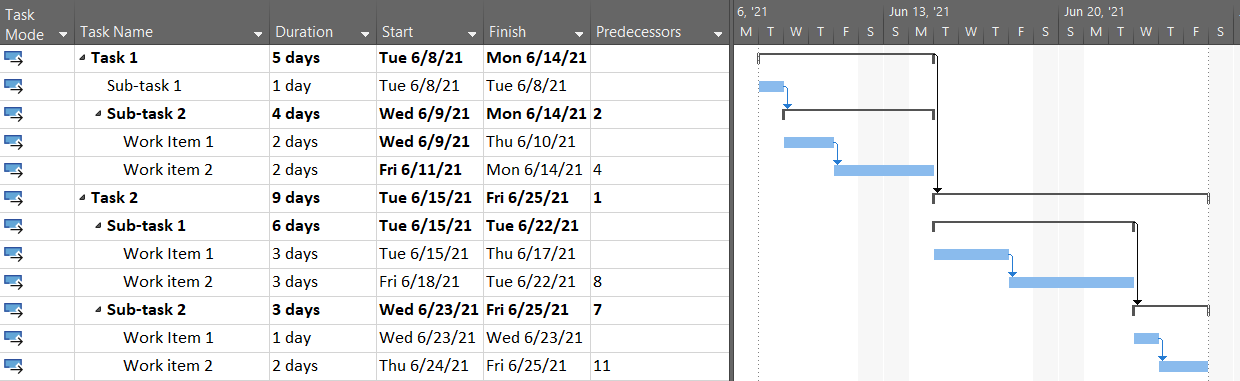
The RtR office relocation project used a deliverable orientation at the second level, because the four major output areas were distinct enough to assign, estimate, and track independently. That choice made the 100% check against the scope statement straightforward: each deliverable named in the charter appeared as a branch, and each branch decomposed to assignable work packages. The structure below shows the full second level and one branch at work-package depth. Every entry is a noun. The verbs, the activities that produce each work package, come next, in the schedule planning chapter that follows.
| WBS Code | Deliverable | Level |
|---|---|---|
| 1.0 | RtR Office Relocation | Project |
| 1.1 | Location Acquisition | Major Deliverable |
| 1.1.1 | Property Search and Candidate Assessment | Work Package |
| 1.1.2 | Lease Negotiation and Execution | Work Package |
| 1.1.3 | Site Condition and Infrastructure Assessment | Work Package |
| 1.2 | Physical Move | Major Deliverable |
| 1.2.1 | Office Furniture and Workstation Relocation | Work Package |
| 1.2.2 | Equipment and Fleet Transport | Work Package |
| 1.2.3 | Warehouse Materials and Inventory Move | Work Package |
| 1.3 | IT and Security Infrastructure | Major Deliverable |
| 1.3.1 | Network Cabling and Hardware Installation | Work Package |
| 1.3.2 | Security Systems Installation and Configuration | Work Package |
| 1.3.3 | Communications and Phone System Setup | Work Package |
| 1.4 | Staff Transition | Major Deliverable |
| 1.4.1 | Change Management and Staff Communications | Work Package |
| 1.4.2 | Move Day Coordination and Cutover | Work Package |
| 1.5 | Project Management | Major Deliverable |
| 1.5.1 | Project Plan and Baseline Documentation | Work Package |
| 1.5.2 | Vendor Management and Contract Administration | Work Package |
| 1.5.3 | Steering Committee and Governance | Work Package |
Thirteen work packages across four deliverable areas, with project management as a fifth. Each traces to something named in the scope statement. The parent-child check confirms that 1.3 IT and Security Infrastructure equals the sum of 1.3.1, 1.3.2, and 1.3.3, nothing more and nothing less. Project management appears as its own branch because the PM artifacts, the plan, governance records, and vendor contracts, are real outputs the project produces, not invisible overhead. Leaving them out of the WBS would violate the 100% rule and leave those work packages without estimates, assignments, or schedule slots.
Beyond format, a WBS can be organized in different ways at the second level, the first breakdown below the project name. Some teams organize by major deliverable: the client portal, the reporting module, the training program, the documentation package. This orientation makes scope coverage easy to verify and tends to work well when the project produces a set of distinct outputs. Others organize by project phase: discovery, design, build, test, deploy. Phase orientation reflects how the work flows in time and is natural when the project has a strong sequential structure. A third approach organizes by department or function, which is useful when ownership tracks closely to organizational boundaries and the major concern is making clear which group is accountable for which portion of scope.
No single orientation is correct for every project. The right choice depends on how the WBS will be used to communicate progress and assign work. A project with a large number of independent deliverables tends to be clearest organized by deliverable. A phased project with strong sequential dependencies is often clearest organized by phase. When in doubt, organize by deliverable: it maps most directly to the scope statement and makes the 100% check the most straightforward to execute.
One rule applies at every level of the WBS, in every format, and without exception: a parent is exactly equal to the sum of everything beneath it. The "Backend System" branch contains exactly what its three work packages represent, nothing more and nothing less. When you roll up estimates from the work packages, the sum is the estimate for the parent. When all the work packages beneath a branch are complete, the branch is complete. No hidden work, no implicit tasks that were understood but not written down, no double-counted entries that appear under two parents and get estimated twice.
This rule is what makes the WBS usable as an estimating and tracking tool rather than a decorative org chart. Violations are almost always accidental: a work package placed under the wrong parent, a deliverable split across two branches without adjustment to the parent scope, an item that made it into the structure twice under slightly different names. Finding these violations before the schedule is built is straightforward. Finding them after the cost model has been built on top of them is expensive.
A WBS is designed for visual clarity, which means its entries are short labels: "Client Portal," "Training Program," "API Integration Layer." These labels show where a deliverable sits in the hierarchy. They do not say what the deliverable includes, what it excludes, or how the team will know when it is finished. The WBS dictionary carries that detail.
Each work package that warrants it gets a dictionary entry with a clear description of what the deliverable covers, what is explicitly outside its boundary, the acceptance criteria for that specific work package, and any relevant notes on dependencies or constraints. The WBS remains a clean structural view. The dictionary carries the precision. Together, they give the project both an accessible overview and an unambiguous specification for the items where ambiguity is expensive.
The table below shows a single dictionary entry for work package 1.3.1 from the RtR project. The WBS label is four words. The dictionary entry is what turns those four words into a buildable, estimable, testable commitment.
| Field | Entry |
|---|---|
| WBS Code | 1.3.1 |
| Work Package Name | Network Cabling and Hardware Installation |
| Description | Supply and install structured Cat6 cabling throughout the new office and warehouse space. Install network switches, patch panels, and wireless access points per the approved network design. Includes all conduit, terminations, and cable management hardware. |
| Exclusions | End-user devices (laptops, monitors, phones). Server room fit-out (covered under 1.3.2). ISP handoff point — the ISP delivers to the demarcation point only; this work package begins there. |
| Acceptance Criteria | All network drops test clean at 1 Gbps. Wireless coverage confirmed in all designated work areas. Network engineer and IT manager sign the test report before this work package is marked complete. |
| Dependencies | Site access granted (predecessor: 1.1.2 Lease Execution). Approved network design drawing on hand before procurement. Hardware delivery confirmed before installation begins. |
| Assigned To | Licensed cabling contractor (external). Network engineer (RtR IT staff) signs off on the test report. |
Not every project needs a full dictionary, and not every work package in a project that has one needs an entry. The question is always the same: where would a misunderstanding about what this work package contains cost the project real time or money? A work package label like "User Training Session" could be interpreted as a single ninety-minute session for one group, or as a multi-day curriculum with role-based tracks and a certification component. If that ambiguity exists and is unresolved, the effort estimate will reflect whoever's interpretation the estimator happened to hold. A dictionary entry resolves it before the estimate is made, which is the only moment where the resolution is free.
There are two main approaches to building a WBS, and most effective sessions use both in combination. Top-down decomposition starts with the project at level one, identifies major deliverable areas at level two, then breaks each area down from there. You begin by asking what the largest natural groupings of output are, establish those as branches, and then decompose each branch progressively. Top-down produces structure early and makes uneven coverage visible: if one branch has six work packages and another has one, the gap is an invitation to look more closely at the thin branch rather than assume it is simpler.
Bottom-up starts with the people in the room and a simple question: what does this project have to deliver? Sticky notes or a whiteboard works well. Each person writes down everything they believe belongs in the project's output, one item per note, without organizing or filtering. The result is volume, redundancy, items described at multiple levels of detail, and gaps where nobody thought to write an obvious thing down because they assumed someone else would. The organizing pass converts that raw output into a hierarchy: group related items, identify which items are sub-components of others, find the pieces that should be parents rather than leaves. Then run the 100% check against the scope statement.
Both approaches have characteristic failure modes when used in isolation. Top-down tends to be complete in the areas the PM knows and thin in areas that require technical depth from SMEs. Bottom-up tends to produce good completeness in what the team knows individually but can miss items that fall between people's domains. Running both in sequence, top-down first to establish the structure and bottom-up to populate and challenge it, combines the structural discipline of the first with the completeness pressure of the second.
The quality of a WBS correlates directly with the quality of the people who built it. The PM needs to be there to maintain the structural rules: deliverables not actions, no double-counting, parent equals sum of children, 100% coverage of the scope statement. But the PM cannot supply the content alone. Each major area of the WBS needs a subject matter expert who knows what that area actually produces at the work package level. This is not an optional enrichment. It is the mechanism by which the WBS becomes a reliable representation of real scope rather than the PM's informed guess about it.
The practical implication is that WBS development sessions take time to arrange correctly. Getting the right eight people into a working session for three hours is harder than the PM spending an afternoon alone with a spreadsheet. It is also the difference between a WBS that holds through execution and one that surprises the team with gaps when they cannot afford them. The cost of the session is paid once. The cost of the gaps is paid every time one surfaces during delivery.
Three mistakes surface consistently in WBS attempts. The first is uneven decomposition: going to work-package depth in one branch while leaving another at the major-deliverable level, usually because the shallow branch is less familiar or less well understood at the time of the session. The structure looks complete and is not. Coverage varies by how well the PM knows each area, which is not the same as how complex each area actually is. The fix is to check depth across all branches before considering the WBS finished, and to bring the right SMEs into the areas that were left shallow.
The second is organizing by resource rather than deliverable, placing "IT Department Work" or "Marketing Team Activities" as a branch instead of the outputs those groups will produce. The WBS is about what gets built, not who builds it. Resource assignments come after the WBS is complete, not during its construction. A WBS organized by department looks like a responsibility chart and functions like one: it answers who is involved rather than what will be delivered, which is the wrong question for a scope decomposition.
The third is stopping too soon: leaving work packages at a level of abstraction where they cannot be estimated reliably or assigned to a clear owner. "IT Infrastructure" is not a work package. "Network cabling and hardware installation for floors 3 and 4" is one. The difference matters when the team sits down to estimate. The first produces a number that somebody invented. The second produces a number that somebody can stand behind.
A WBS is ready to build a schedule from when three tests pass. Every deliverable in the scope statement appears somewhere in the structure and can be located by tracing down from the project level. Every work package is specific enough to assign to a named person or team and estimate with a confidence the team can defend. And at every level, a parent is exactly equal to the sum of what falls beneath it, with no gaps, no overlaps, and no phantom entries.
Reaching that standard usually takes more than one session. The first run produces a structure. A review, where each SME checks their area for completeness and the full group looks for gaps between areas, is where the WBS becomes reliable enough to act on. The review is not bureaucracy. It is the point where the structure transitions from a draft to a commitment: this is what the project contains, this is the complete scope, and the schedule and cost model built from this structure will reflect reality rather than approximation. That transition is worth the session it takes to achieve it.
With the full scope structured into the WBS, the next step is to turn those work packages into an executable schedule. The next chapter covers defining the activities that produce each work package, sequencing them in the order they must occur, and estimating how long each will take. Those three steps are what transform a structured scope map into a timeline the team can commit to.
Take the next big step in your project management career with HK School of Management. Whether you're breaking into the field or aiming for your dream job, this course gives you the tools to stand out, impress in interviews, and secure the role you deserve.
This isn’t just another job-hunting guide—it’s a tailored roadmap for project managers. You’ll craft winning resumes, tackle tough interview questions, and plan your first 90 days with confidence. Our hands-on approach includes real-world examples, AI-powered resume hacks, and interactive exercises to sharpen your skills.
You'll navigate the hiring process like a pro, with expert insights on personal branding, salary negotiation, and career growth strategies. Plus, downloadable templates and step-by-step guidance ensure you're always prepared.
Learn from seasoned professionals and join a community of ambitious project managers. Ready to land your ideal job and thrive in your career? Enroll now and take control of your future!
Explore the CourseHK School of Management helps you apply AI to Agile work with practical, prompt-based workflows for real-world Scrum challenges. Practical skills, tools, and guidance you can apply right away. Covered by Udemy's 30-day refund policy.
Learn MoreUnlimited redemptions
Available until September 18, 2026 5:09 PM PDT
66D6FD5906E09C4284FE