

Pick a night last week. Say at 02:10 someone used a remote session to reach an engineering workstation on your control network and pushed a modified logic file to one PLC. Nothing tripped. The process kept running.
Now write down, honestly, the hour at which somebody at your plant would have known. Not the hour a tool logged it. The hour a person who could do something about it found out.
Most plant teams cannot write that number down. The SANS 2026 State of ICS/OT Security survey suggests the number is getting worse across the industry, and this post gives you a way to measure your own before the next incident measures it for you.
The number that moved the wrong way
The survey, reported by the SANS Institute on 10 November 2026, drew on 696 people who work in industrial security. Its headline is hard to miss: 34% of respondents had an ICS/OT cyber incident in the past 12 months, up from 21.5% the year before. SANS calls it the largest single-year rise it has recorded.
The quieter finding matters more for day-to-day work. Only 41% of incidents were detected within 24 hours, down from more than half a year earlier. SANS reports this as the first time detection has slowed since it began tracking it.
The consequences were physical. 72% of reported incidents caused facility or system downtime, and 13% of respondents said an incident affected safety, up from under one in ten the year before.
Two cautions before you act on any of it. The figures are self-reported by practitioners, not measured by an auditor. And the survey was sponsored by seven security vendors, several of whom sell OT monitoring. Treat the exact percentages loosely and the direction seriously: nearly 700 practitioners answered, and detection slowed against the survey's own earlier years.
Detection time is a relay, not a product feature
When people hear "detection got slower", they picture a monitoring tool that missed something. That is rarely the whole story. Detection is a relay, and the baton is a piece of evidence.
Four hand-offs have to happen before anyone can act on an incident:
- Recorded. Something writes the event down: a switch, a firewall, a historian, a PLC's own change log.
- Seen. A person or a tuned alert looks at that record.
- Recognised. Whoever looks knows it is abnormal and not routine maintenance.
- Escalated. It reaches someone with the authority to isolate, call the vendor or stop the line.
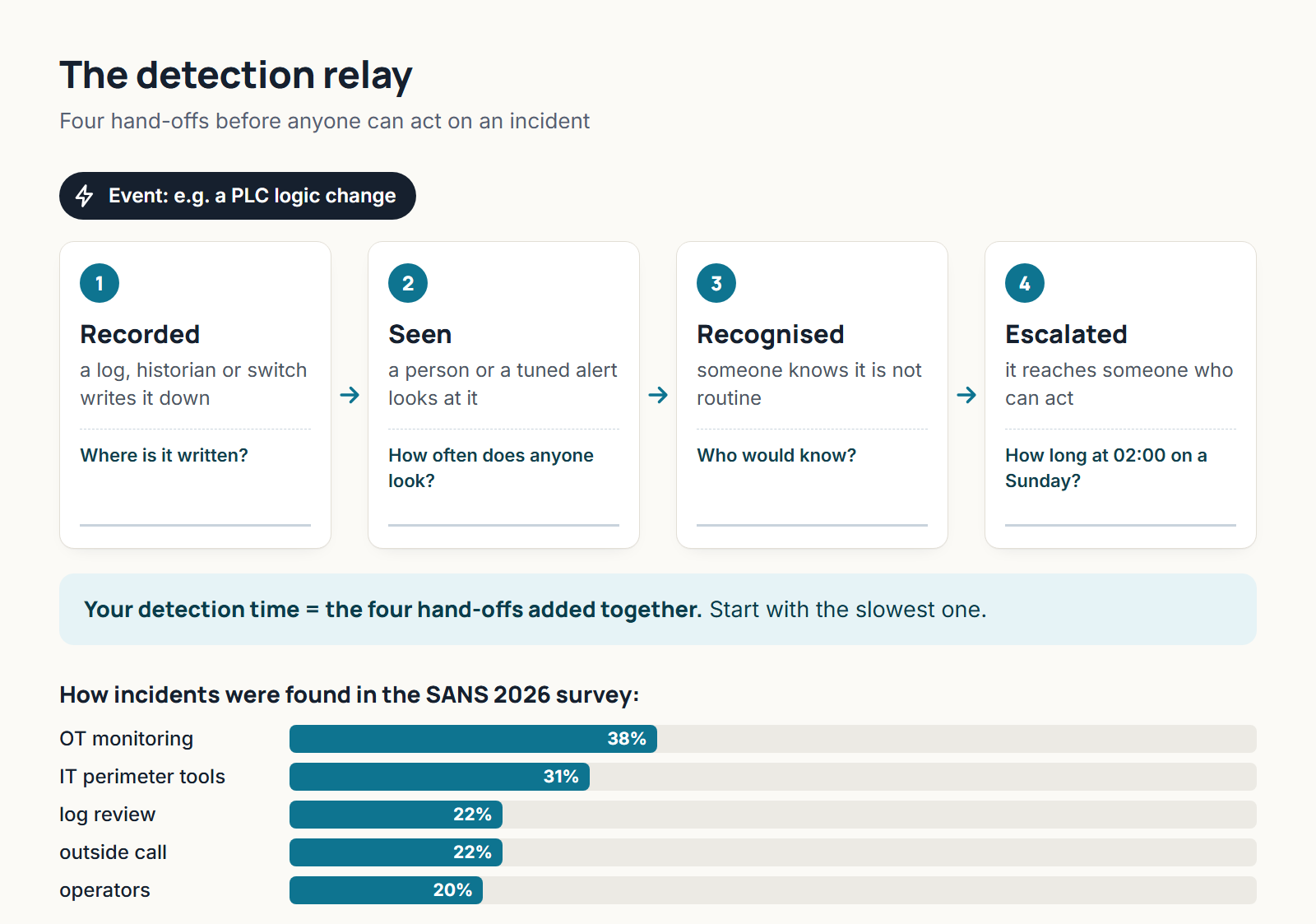
Your detection time is the sum of those four hand-offs. A plant with excellent logging and a monthly log review can still take a month to detect.
The survey shows how spread out the relay already is. Dedicated ICS/OT monitoring platforms caught 38% of incidents, IT perimeter tools such as firewalls and intrusion detection 31%, periodic log or change review 22%, a call from a third party 22%, and human operators 20%. The shares add up to more than 100%, so some incidents were caught by more than one route. Even so, three of those five routes run through a person, a calendar or a phone call rather than an alarm.
The detection self-check: four events, one afternoon
Here is the check. It needs a whiteboard, two hours, and three people: someone from operations, someone from controls or OT engineering, and whoever owns IT security for the site.
Take four events that matter in almost any plant:
- A device nobody recognises appears on the control network. A contractor's laptop, a new cellular router, a spare HMI someone plugged in.
- PLC logic or a critical setpoint changes outside an approved change window.
- A remote access session starts at an unusual hour, or from an account that rarely uses it.
- An outside party calls. Your automation vendor, a national CERT or a sector information-sharing group says one of your addresses is talking to something it should not.
For each event, walk the relay and write a time against every hand-off:
| Hand-off | The question to answer | Write down |
|---|---|---|
| Recorded | Where exactly is this written down, if anywhere? | System name, or "nowhere" |
| Seen | Who looks at that record, and how often? | Name of role, and the interval |
| Recognised | Would that person know this is abnormal? | Yes, no, or "only one person would" |
| Escalated | How do they reach someone who can act, at 02:00 on a Sunday? | The route, and how long it takes |
Add the four times. That total is your estimated detection time for that event. The slowest single hand-off is where to start this month.
Do the walk on paper first. If you later want to prove a hand-off with a live test, run it only in an approved maintenance window with operations agreeing to it, and never touch a safety instrumented system to make the point.
Where the slow hand-offs usually hide
Teams that run this check tend to find the same four gaps.
The record nobody reads. Periodic review found 22% of incidents in the survey. A review that happens monthly gives the attacker up to a month. Ask when someone last opened the PLC change log or the OT firewall log, and put a weekly 15-minute review on a named person's calendar.
The operator who noticed but did not say. Operators found 20% of incidents, yet only 58% of organisations that rely on operators for detection have formally trained them. The fix is small: give each shift three things to watch for (a setpoint that moved by itself, a screen that behaves differently, a device or login nobody expected) and one number to call. Write the number on the console.
The outside call that lands in the wrong inbox. Third-party notification was as common as log review. If a vendor or a CERT emails a generic sales or info address, your detection clock runs while the message sits there. Check which address and phone number outsiders actually have for you.
The one person who can read the evidence. 68% of respondents said losing one or two key people would delay their response or put operations at serious risk. In the relay, that person is the "recognised" hand-off. When they are on leave, that hand-off takes as long as their holiday.
The survey also names what stops teams from adding more monitoring: budget (43%), fear of disrupting operations (40%) and not enough people to tune alerts (40%). The average organisation has detection covering 61% of its sites. Most of the fixes above cost a calendar entry and a phone number, which makes them a sensible first month before any purchase.
Put the people who detect into the rehearsal
The survey has one more number worth carrying into your next exercise. In Help Net Security's report on the survey, leaders said enterprise IT security is required in 83% of their ICS/OT tabletop exercises, the ICS/OT security team in 71%, and plant managers and frontline staff in only 58%. Those figures come from the smaller group of leaders in the survey, not all 696.
That is backwards for detection. The people closest to an abnormal setpoint are the ones least often in the room when the plan is rehearsed.
So feed the self-check into your next tabletop. Use the slowest hand-off you found as the opening event, and make sure the operator, the controls engineer and the person who answers the outside phone line are in the room. If one of the four hand-offs depends on a single person, run the exercise without them and see what happens.
What this check will not tell you
The self-check measures the events you thought of, through the records you already keep. If a system logs nothing, the check will show "nowhere" in the first column. That is useful, but it cannot find an attack that leaves no trace in anything you own.
It also does not tell you what to do once you know. A plant that detects in two hours and then spends six arguing about who may isolate a network segment has not gained much. Detection time and response time are two halves of the same clock.
That second half is a written incident response plan: who decides, what gets isolated first, when the process goes to manual, who calls the vendor and the regulator. Run the self-check this month, keep the table, and use it as the first page of that plan.
If you want to write that plan properly, the ICS/OT Incident Response Plan course walks through it section by section and ends with a complete plan written for a fictional site. The ICS/OT IRP Builder, sold separately, is a set of Claude skills that runs in your own Claude account and drafts each section of the plan, from charter to export, using your own plant's details.